
Managing support tickets manually takes time. Support teams must read each ticket, choose the right department, assign an agent, and track response deadlines. When ticket volumes increase, some requests may be delayed or missed.
Help desk automation rules help reduce this manual work. Output Desk lets you automate ticket assignment, department routing, replies, priority changes, and status updates. SLA rules help your team monitor response and resolution deadlines.
What Are Help Desk Automation Rules?
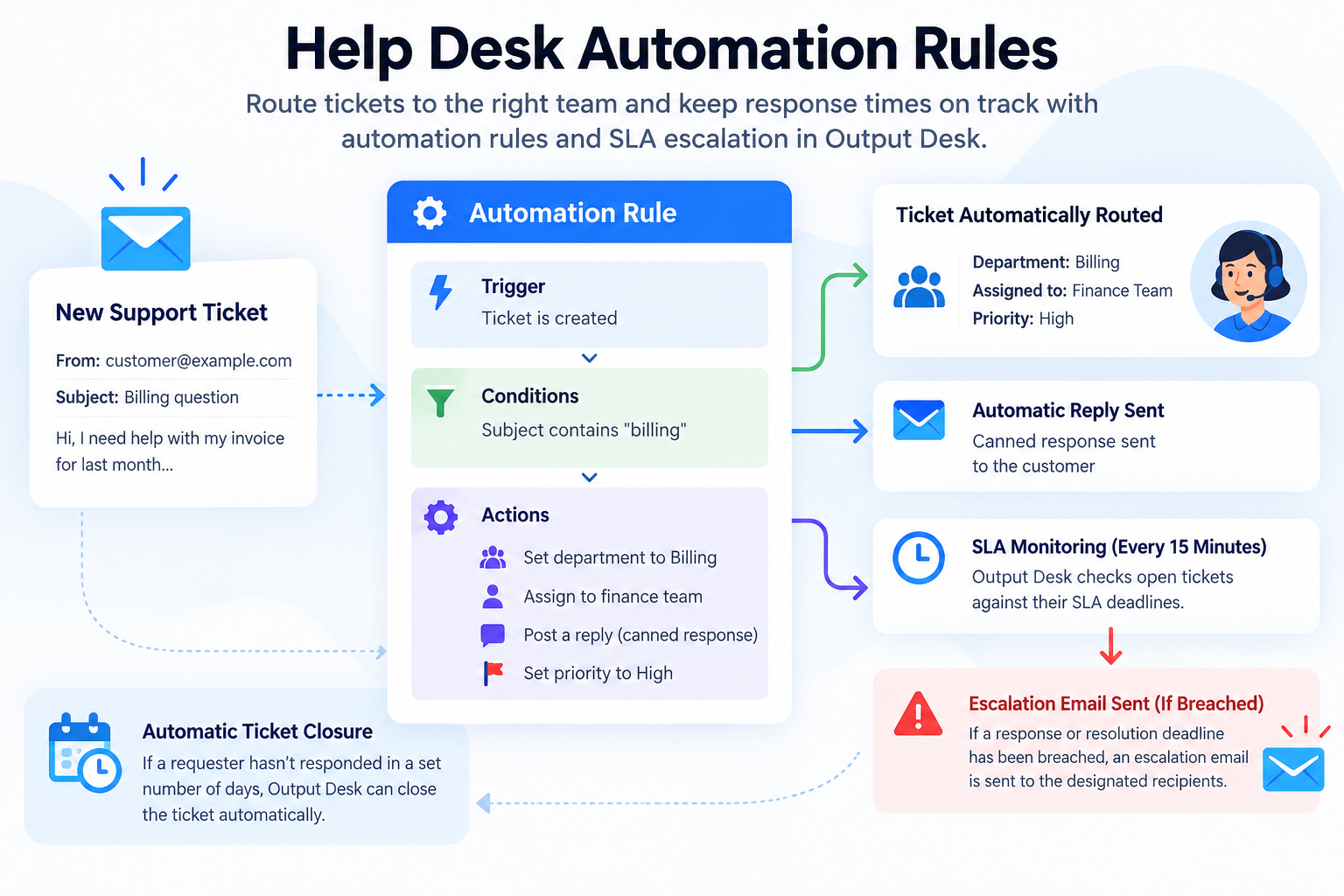
Help desk automation rules perform actions automatically when a ticket meets specific conditions. Each rule has three main parts:
- Trigger : The event that starts the rule, such as a new ticket or a customer reply.
- Condition : The requirement the ticket must meet, such as a matching subject, sender, department, or status.
- Action : What Output Desk does when the condition matches, such as assigning an agent or changing the ticket priority.
Put together, a rule reads naturally: “When a ticket is created, if the subject contains ‘billing,’ set the department to Billing and assign it to the finance team.” That’s ticket routing automation in practice — no one has to triage the ticket by hand, because it’s already in the right queue the moment it lands.
There’s also a built-in auto-closure rule for tickets that have gone quiet: if a requester hasn’t responded in a set number of days, Output Desk can close the ticket automatically, keeping your open queue honest.
And since one of the available actions is “Post Reply,” automation rules can work hand in hand with your canned responses — a matching rule can send a pre-written reply the moment a ticket comes in, before an agent even opens it.
SLA Escalation: Keeping Response Times on Track
Routing a ticket to the right place is only half the job — it also needs a response in time. That’s where SLA escalation comes in.
You can define response and resolution targets per priority level in your SLA rules, and Output Desk calculates them using real business hours, so a ticket that arrives Friday evening doesn’t quietly breach its SLA over the weekend.
Every 15 minutes, Output Desk checks open tickets against their SLA deadlines. If a response or resolution deadline has been breached, it automatically sends an escalation email to the designated recipients.
Automation and SLA Escalation in Action
- A client’s email is automatically routed to the right department and assigned to the right agent, based on sender or subject — without anyone reading it first.
- A ticket that’s been open longer than its resolution SLA quietly triggers an escalation email to the team lead, instead of surfacing only when the customer complains.
- A conversation that’s gone cold for a week gets closed automatically, instead of sitting in someone’s queue as dead weight.
None of this requires custom development — it’s configured once in Output Desk’s settings and keeps running in the background from there.
FAQ
What is ticket routing automation?
Ticket routing automation uses predefined rules to send support tickets to the appropriate department or agent based on conditions such as the sender, subject, or department.
How does SLA escalation work?
Output Desk checks ticket deadlines every 15 minutes. If a configured response or resolution deadline is breached, it sends an escalation email to the designated recipients.
Can Output Desk assign tickets to the least busy agent automatically?
Output Desk assignment is based on configured rules and conditions. Automatic assignment by workload, round-robin distribution, or load balancing is not supported by the rule-based assignment described here.
Can automation rules send automatic replies?
Yes. You can configure rules to post replies when the specified triggers and conditions match. Predefined responses can help your team answer common questions consistently.
Automate Your Support Workflow with Output Desk
Spend less time managing tickets manually and more time helping customers. Use Output Desk automation rules to organise ticket assignment and SLA escalation to monitor support deadlines.
Explore Output Desk Help Desk Software to learn more about managing customer support.